Pages

January 3, 2011

Freeup or clean RAM using Notepad


RAM - Random Access Memory is one of the main component of computer that is responsible for the process of the operating system. Since all the Operating systems support Multiprocessing, hence require a good RAM speed.
Since all the current running processes are stored onto the RAM, it slows the system speed. Sometimes the process which have executed but are not required by the OS are stored on the RAM. So, we can remove or freeup the RAM with unused junk data to Speedup the System or processing speed.
We can clean the RAM just by using a Notepad application. This donot require any advanced software. 
The process to do so is as follows.

Open Notepad
Type
FreeMem=Space(64000000)
save it as “CleanRAM.vbs” on desktop

Note: Type the name of file along with inverted commas
Run the file and your RAM may be free.
Of course you can edit the code in the file for a greater “cleaning-progress”.
 
For example:
FreeMem=Space(1280000000)
FreeMem=Space(2560000000)
FreeMem=Space(5120000000)
FreeMem=Space(10240000000)

Chat with Friends through ms dos Command Prompt (CMD).

1) All you need is your friend's IP Address and your Command Prompt.

2) Open Notepad and write this code as it is.....!
@echo off
:A
Cls
echo MESSENGER
set /p n=User:
set /p m=Message:
net send %n% %m%
Pause
Goto A

3) Now save this as "Messenger.Bat".

4) Open Command Prompt.

5) Drag this file (.bat file) over to Command Prompt and press Enter.

6) You would then see something like this:


7) Now, type the IP Address of the computer you want to contact and press enter You will see something like this: 

 
8) Now all you need to do is type your message and press Enter.
Start Chatting.......!  


January 2, 2011

Top 5 Most Famous Hackers of All Time


. . .Top 5 Most Famous Hackers of All Time. . .

 
1. Jonathan James : James gained notoriety when he became the first juvenile to be sent to prison for hacking. He was sentenced at the age of 16 . In an anonymous PBS interview, he professes, "I was just looking around, playing around. What was fun for me was a challenge to see what I could pull off." James also cracked into NASA computers, stealing software worth approximately $1.7 million.


2. Adrian Lamo : Lamo's claim to fame is his break-ins at major organizations like The New York Times and Microsoft. Dubbed the "homeless hacker," he used Internet connections at Kinko's, coffee shops and libraries to make his intrusions. In a profile article, "He Hacks by Day, Squats by Night," Lamo reflects, "I have a laptop in Pittsburgh, a change of clothes in D.C. It kind of redefines the term multi-jurisdictional."


3. Kevin Mitnick : A self-proclaimed "hacker poster boy," Mitnick went through a highly publicized pursuit by authorities. His mischief was hyped by the media but his actual offenses may be less notable than his notoriety suggests. The Department of Justice describes him as "the most wanted computer criminal in United States history." His exploits were detailed in two movies: Freedom Downtime and Takedown.


4. Kevin Poulsen : Also known as Dark Dante, he gained recognition for his hack of LA radio's KIIS-FM phone lines, which earned him a brand new Porsche, among other items. His hacking specialty, however, revolved around telephones.


5. Robert Tappan Morris : Morris, son of former National Security Agency scientist Robert Morris, is known as the creator of the Morris Worm, the first computer worm to be unleashed on the Internet. As a result of this crime, he was the first person prosecuted under the 1986 Computer Fraud and Abuse Act.

Defining Hacker..........


Hacker is a word that has two meanings:

Traditionally, a hacker is someone who likes to tinker with software or electronic systems.
Hackers enjoy exploring and learning how computer systems operate.

Recently, hacker has taken on a new meaning — someone who maliciously breaks into systems for personal gains. Technically, these criminals are crackers (criminal hackers). Crackers break into (crack) systems with malicious intent. They are out for personal gain: fame, profit, and even revenge. They modify, delete, and steal critical information, often making other people miserable.


The good-guy (white-hat) hackers don’t like being in the same category as the bad-guy (blackhat) hackers. (These terms come from Western movies where the good guys wore white cowboy hats and the bad guys wore black cowboy hats.) Whatever the case, most people give hacker a negative connotation. Many malicious hackers claim that they don’t cause damage but instead are altruistically helping others. Yeah, right. Many malicious hackers are electronic thieves.

Hackers (or bad guys) try to compromise computers.
Ethical hackers (or good guys) protect computers against illicit entry.

What is Computer Hacking ?


Computer hacking is a process to bypass the security mechanisms of an information system or network.

OR

In common usage, hacker is a generic term for a computer criminal, often with a specific specialty
in computer intrusion. While other definitions peculiar to the computer enthusiast community
exist, they are rarely used in mainstream context...

OR

Computer hacking is an unauthorized use of computer and network resources. (The term "hacker" originally
meant a very gifted programmer. In recent years though, with easier access to multiple systems,
it now has negative implications.)

December 17, 2010

Rename your Start Menu button

You can use the method described above if you want: In the US version of Windows XP Pro, the string is at 0EE36F (Classic-style button) and 0EE096 (XP-style button). But instead, we are going to use Resource Hacker.
2.1. Bypassing Windows File Protection
1. In Windows Explorer, click Tools, Folder Options, then View. Uncheck Hide protected operating system files and check Show hidden files and folders.
2. There is a file named filelist.xml in \windows\system32\Restore. Right click the file, then click Properties, and uncheck Read-only. Open filelist.xml in Notepad, and add the line shown in red below, then save the file and close Notepad.
<exclude>
     
<rec>%systemroot%\explorer.exe</rec>
     <rec>%windir%\system.ini</rec>
     <rec>%windir%\tasks\desktop.ini</rec>
     <rec>%windir%\win.ini</rec>
     <rec>*:\AUTOEXEC.BAT</rec>
     <rec>*:\CONFIG.MSI</rec>
     <rec>*:\CONFIG.SYS</rec>
</exclude>
3. In \windows\system32\dllcache, you will find a backup copy of explorer.exe. Rename it to explorer.bak.
2.2. Changing the name of the Start Menu button


1. Run Resource Hacker, and open \windows\explorer.exe
2. Click String Table > 37 > 1033 (XP-style button)
3. Replace "start" with whatever you want ("hello", in the picture above)
4. Click the Compile Script button.
Repeat steps 3 and 4 for String table > 38 > 1033 (Classic-style button)
5. Save the file (File>Save). Hit Cancel then Yes when Windows File Protection pops up. 

Note: If an error message pops up when saving the file, kill explorer.exe (Clt-Alt-Del > Processes > explorer.exe > End Process > File > New Task), repeat step 5 (save the file in Resource Hacker), and restart explorer.exe (Clt-Alt-Del > Processes > explorer.exe > End Process > File > New Task > explorer > OK).

December 15, 2010

Google Chrome Tips, Tricks, Hacks and Shortcuts

1. Create application shortcut : Create desktop and Start menu shortcuts to web apps such as Gmail - go to Gmail.com and then select  from the Page Control menu (in the top-right corner of your browser - it looks like a page with the corner folded over). Now choose where you want to place your shortcut. This works for other Google apps such as Calendar and Documents, and other services such as Windows Live Hotmail.
2. Control + Shift + N opens an ‘incognito’ window - sites you view in this window won’t appear in your history and cookies served by sites in this window will be deleted when the window is closed.
3. You can open a link in an incognito window by right-clicking the link and selecting Open link in incognito window.
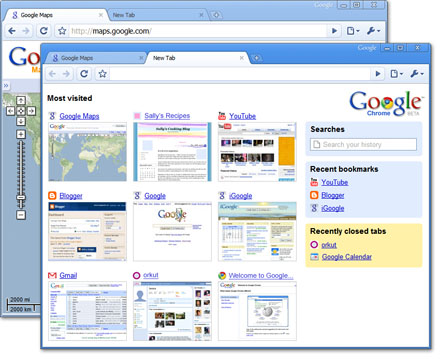
4. Alt + Home loads your Google Chrome home page, with thumbnails of your most visited sites shown in the active tabbed window.
5. Control + T opens a new tab. You can drag tabs around to change their order or drag a tab out of the window into its own window.
6. Control + Shift + T opens your most recently closed tab. Press the key combination again to open the tab closed before that one. Google Chrome remembers the last 10 tabs you’ve closed.
7. Jump to different open tabs using Control + 1, Control + 2, Control + 3, etc. Control + 9 takes you to the last tab.
8. Control + Tab lets you cycle through your open tabs in order.
9. Control + Shift + Tab cycles through your tabs in the opposite order.
10. As with Firefox 3, you can drag a link onto a tab to open it in that tab, or drop it between two tabs to open a new tab in that position.
11. To bookmark a site click the star on the left of the address bar and then select a folder to add it to.
12. Control +B hides the Google Chrome bookmarks bar. Press Control + B to bring it back again.
13. Right-click or hold down the back button and you’ll get a drop-down list of sites to go back through. Show Full History, at the bottom of the list, opens a new tab with your full browser history.
14. Control + H is a faster way to bring up the History page.
15. You can delete history for chosen days by scrolling to the day you want to delete and clicking Delete history for this day on the right-hand side of the window.
16. Control + J brings up your Downloads page.
17. To clear an item from your Downloads page, right-click an entry and select Remove.
18. Press Control + K or Control + E to search from the address bar. Once pressed, you’ll see a ? symbol appear in the address bar and you can simply enter your search query and hit Return.
19. Right-click the top of the browser window and select Task manager to see how much memory different tabs and plug-ins are using. Highlight one and click End process to stop it running.
20. Shift + Escape is a quicker way to bring up the Google Chrome Task manager.
21. To see what plug-ins are installed, type about:plugins into the address window.
22. You can also type the following commands into the Google Chrome address window: about:stats, about:network, about:histograms, about:memory, about:cache, about:dns.
23. Type about:crash to see what a crashed tab looks like.
24. A three-second diversion: type about:internets. (Only works in Windows XP.)
25. Edit any web page - right-click a page and select Inspect element. Now edit the HTML source code and hit Return to view the changes.
26. To make Google Chrome your default browser, click the Tools button (in the right-hand corner of the browser window - a spanner icon). Select Options, click the Basics tab and then click the Make Google Chrome my default browser button.
27. To delete cookies, go to Tools > Options > Under the Hood. Scroll down to the Security section, and click Show cookies. Now you can click Remove all or remove individual cookies.
28. To clear more data such as the Google Chrome browsing history and cache, click the Tools icon and select Clear browsing data…
29. To clear the most visited web sites that appear on your Google Chrome start page, you must clear your browsing history using the method above.
30. Clearing your Google Chrome browser history will also stop matches from previously browsed sites appearing as suggestions in your address bar.